16 Redesigning my Portfolio Website
Published on Aug 18, 2025
A New Era of AI-Powered Coding Begins
I have installed Cursor on my laptop this weekend, and I am amazed at how much it speeds up my coding. I have a new debugging buddy!!
This week, I have made several updates to the Portfolio website.
The Challenge: When OpenAI Falls Short
In my previous post, I shared the excitement of implementing a chatbot based on ChatGPT for my portfolio website. The initial experience was promising - I successfully created content embeddings and integrated them with OpenAI's API. However, as many developers know, relying on a single service provider can lead to unexpected roadblocks.
When my OpenAI account encountered issues, I faced a critical decision: abandon the chat functionality or find an alternative solution. I chose the latter, embarking on a journey that would transform my portfolio's AI capabilities and teach me valuable lessons about building robust, fallback-ready systems.
The Migration: Embracing Open Source AI
The transition from OpenAI to Hugging Face wasn't just a simple API swap - it was a complete architectural evolution. Here's what I learned:
1. Model Selection Complexity Finding the right model on Hugging Face proved more challenging than expected. After testing several options:
microsoft/DialoGPT-medium- No inference provider availablegpt2anddistilgpt2- Limited conversational capabilitiesQwen/Qwen3-4B- Perfect fit with thenebiusprovider
2. Database Architecture Evolution The migration also prompted a database upgrade from MongoDB to Neon PostgreSQL. This wasn't just about changing providers - it was about building a more scalable, production-ready foundation for my portfolio.
Technical Implementation: Building Resilience
Streaming Responses for Better UX One of the most significant improvements was implementing streaming text responses. Instead of waiting for complete AI responses, users now see text appear word-by-word, creating a ChatGPT-like experience:
// Streaming implementation with word-by-word appearance
const stream = new ReadableStream({
  start(controller) {
    const encoder = new TextEncoder();
    const words = response.split(' ');

    words.forEach((word, index) => {
      setTimeout(() => {
        controller.enqueue(encoder.encode(word + ' '));
        if (index === words.length - 1) {
          controller.close();
        }
      }, index * 100);
    });
  }
});
Robust Fallback System I implemented a multi-layered fallback approach:
- Vector Search: Primary method using Pinecone embeddings
- Text Search: Fallback to simple text matching
- Intelligent Responses: Pre-built responses for common queries
User Experience Improvements
Input Focus Management Users can now have continuous conversations without losing focus:
useEffect(() => {
  if (inputRef.current) {
    inputRef.current.focus();
  }
}, [messages]);
Response Filtering Hidden internal AI processing tags for cleaner output:
const cleanResponse = response.replace(/<think>.*?<\/think>/gs, '');
Performance & Scalability
Database Optimization
- Migrated from MongoDB to Neon PostgreSQL
- Updated Prisma schema for better type safety
- Implemented proper ID handling for vector search
API Efficiency
- Reduced response times with streaming
- Implemented proper error handling
- Added comprehensive logging for debugging
Lessons Learned
- Always Have a Plan B: Building fallback systems from the start saves time and maintains user experience
- Open Source is Powerful: Hugging Face provides enterprise-grade AI capabilities without vendor lock-in
- User Experience Matters: Small details like input focus and streaming responses significantly improve perceived performance
- Database Architecture: Choosing the right database from the start prevents migration headaches later
Current Status & Future Plans
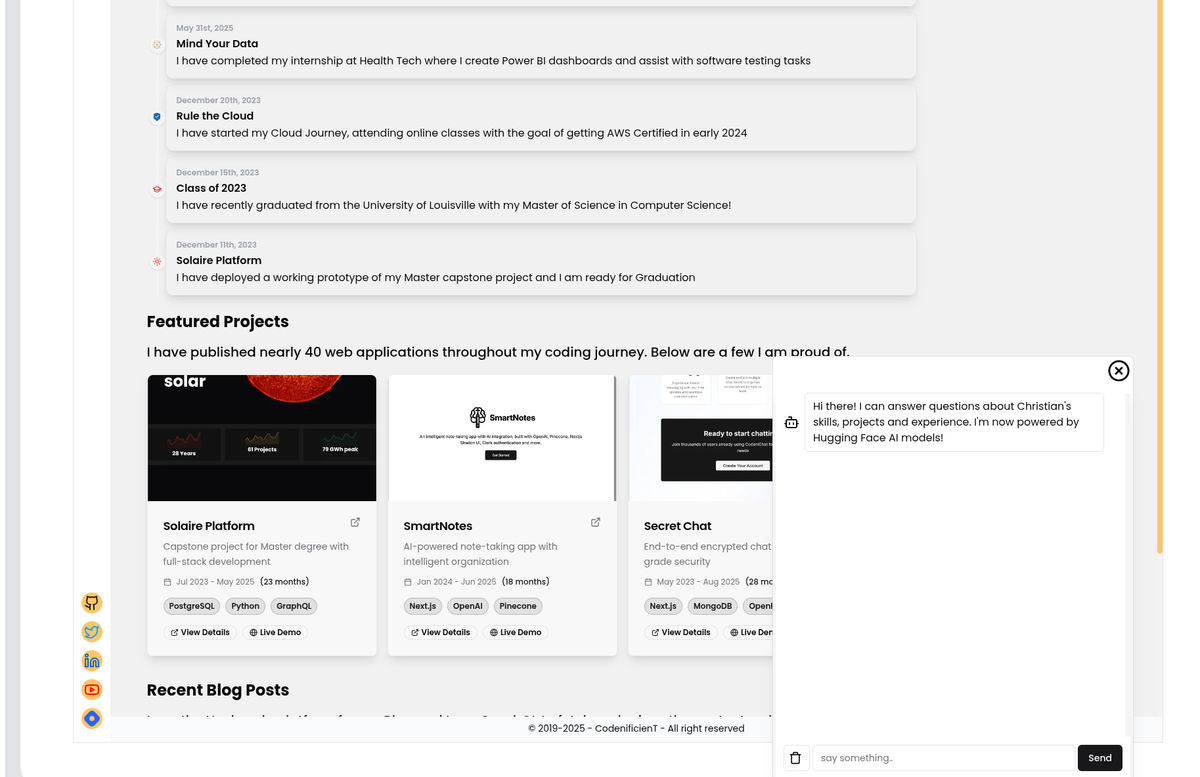
The chat functionality is now fully operational with:
- ✅ Hugging Face AI integration via Nebius
- ✅ Streaming text responses
- ✅ PostgreSQL database backend
- ✅ Robust error handling
- ✅ Clean, professional UI
Next Steps:
- Implement user analytics for chat interactions
- Add conversation history persistence
- Explore multi-language support
- Integrate with more AI models for specialized responses
Conclusion
This migration taught me that technical challenges often lead to better solutions. What started as a simple API replacement evolved into a more robust, scalable, and user-friendly chat system. The journey from OpenAI to Hugging Face wasn't just about solving a problem - it was about building something better.
For developers facing similar challenges, remember: every obstacle is an opportunity to improve your architecture and learn new technologies. The result is often a more resilient and feature-rich application.
Technical Stack Used:
- Next.js 15.0.0
- Hugging Face Inference API
- Neon PostgreSQL
- Prisma ORM
- Pinecone Vector Database
- Tailwind CSS
- TypeScript
Resources:
This blog post captures the technical journey, challenges faced, and solutions implemented while maintaining the professional tone and technical depth that your readers expect. It also provides valuable insights for other developers who might face similar migration challenges.