🎉 My First NPM Package is Live!
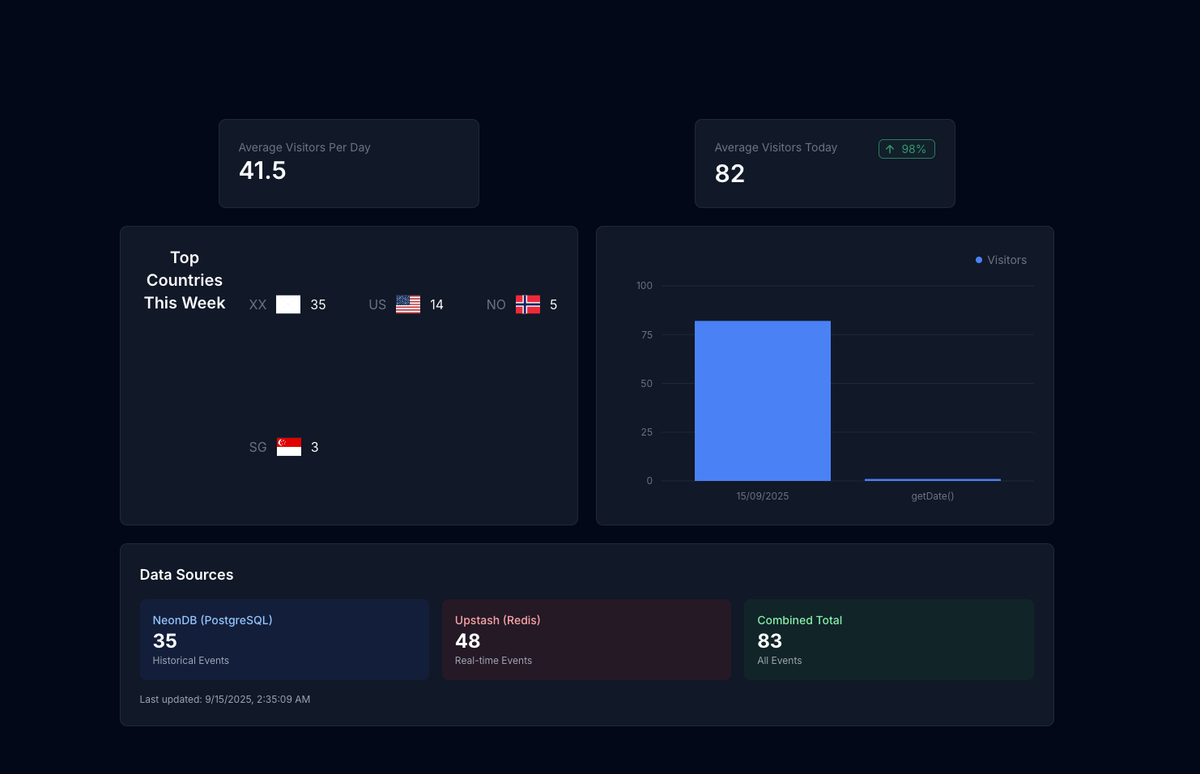
Published: September 15, 2025
I'm absolutely thrilled to announce that I've successfully published my very first NPM package to the public registry! After months of development, testing, and refinement, @codenificient/analytics-sdk is now live and ready for developers worldwide to use.
🚀 The Journey to My First Package
Building and publishing an NPM package has been a dream of mine since I started my journey as a developer. There's something incredibly satisfying about creating a tool that other developers can use to build better applications. The process taught me so much about:
- Package management and semantic versioning
- TypeScript configuration for libraries
- Documentation standards and API design
- Testing strategies for reusable code
- Publishing workflows and CI/CD for packages
🛠️ What is @codenificient/analytics-sdk?
My analytics SDK is a comprehensive, TypeScript-first solution for multi-tenant analytics tracking. It's designed to be:
🌍 Universal & Intelligent
- Real-time analytics with instant event processing
- Automatic geolocation detection (country, region, city, timezone)
- Multi-tenant architecture supporting multiple projects and API keys
- Universal compatibility with both browsers and Node.js environments
⚡ Developer-Friendly
- TypeScript-first with full type safety and IntelliSense
- Lightweight with minimal bundle size
- Comprehensive tracking for page views, custom events, and batch operations
- Easy integration with just a few lines of code
🔧 Key Features
import { Analytics } from "@codenificient/analytics-sdk";

const analytics = new Analytics({
  apiKey: "your-api-key",
  endpoint: "https://your-analytics-api.com",
});

// Track page views with automatic geolocation
await analytics.pageView("/dashboard");

// Track custom events
await analytics.track("user-action", {
  action: "button-click",
  element: "cta-button",
});

// Track blog views with categorization
await analytics.blogView("my-blog-post", {
  title: "My Amazing Post",
  category: "technology",
});
🐕 Dog Fooding My Own Package
The best part? I'm already "dog fooding" (using my own product) across multiple applications! There's no better way to test and improve a package than by using it in real-world scenarios.
📊 Current Implementation
I've integrated my analytics SDK across several of my deployed applications:
1. Portfolio Website (This Site!)
- Page view tracking for all sections
- Blog post analytics to understand content engagement
- Project detail views to see which projects generate interest
- Geolocation insights to understand my global audience
2. CodeniWeather App
- Weather app usage patterns and feature adoption
- Map interaction tracking to optimize user experience
- Theme switching analytics to understand user preferences
3. SmartNotes AI Application
- AI feature usage and user engagement metrics
- Note creation patterns and productivity insights
- Search behavior to improve AI recommendations
🎯 What I'm Learning
Using my own package has revealed incredible insights:
- Real user behavior vs. what I assumed users would do
- Performance bottlenecks I never noticed in development
- Feature adoption rates that guide my product roadmap
- Geographic distribution of my users (surprisingly global!)
🌟 The Impact on My Development Process
Having analytics built into my applications has completely transformed how I approach development:
📈 Data-Driven Decisions
Instead of guessing what users want, I now have concrete data about:
- Which features are most popular
- Where users spend the most time
- What content resonates with my audience
- How users navigate through my applications
🔍 Performance Insights
- Page load times and user experience metrics
- Error tracking and debugging information
- User flow analysis to optimize conversion paths
- A/B testing capabilities for feature rollouts
🌍 Global Reach Understanding
- Geographic distribution of my users
- Timezone patterns for optimal content scheduling
- Cultural insights that inform my design decisions
- Regional performance variations
🚀 What's Next?
This is just the beginning! I'm already planning:
📦 Package Enhancements
- Real-time dashboard for analytics visualization
- Advanced filtering and segmentation capabilities
- Custom event schemas for better data organization
- Webhook integrations for real-time notifications
🔄 More Applications
I'm planning to integrate the analytics SDK into:
- E-commerce platforms I'm building
- SaaS applications in development
- Open-source projects I contribute to
- Client projects (with permission, of course!)
📚 Community Building
- Comprehensive documentation with examples
- Video tutorials and walkthrough guides
- Community Discord for user support
- Regular updates based on user feedback
💡 Lessons Learned
Building and publishing my first NPM package taught me invaluable lessons:
🎯 Focus on Developer Experience
- Clear documentation is as important as the code
- TypeScript support makes a huge difference
- Consistent API design reduces cognitive load
- Error messages should be helpful, not cryptic
🔄 Iteration is Key
- Start simple and add complexity gradually
- User feedback is gold - listen to it
- Version management requires discipline
- Breaking changes should be rare and well-communicated
🌍 Think Globally
- Geolocation data provides incredible insights
- Timezone handling is more complex than it seems
- Privacy compliance is crucial for user trust
- Performance matters more than features
🎊 The Excitement Continues
I'm genuinely excited about the future of @codenificient/analytics-sdk. Every time I see analytics data flowing in from my applications, I'm reminded of why I became a developer: to build tools that solve real problems and make the web a better place.
The fact that other developers can now use my package to build better applications fills me with pride and motivation to keep improving it.
🤝 Join the Journey
If you're interested in analytics, TypeScript, or just want to see how a first-time package author approaches things, I'd love to connect! You can:
- Try the package:
npm install @codenificient/analytics-sdk - Check out the source: GitHub Repository
- Follow my journey: @codenificient
- See it in action: Visit this portfolio and check the console for analytics logs!
Here's to many more packages, countless analytics insights, and the continued joy of building tools that developers love to use! 🚀
What was your experience publishing your first NPM package? I'd love to hear your stories and lessons learned!
#NPM #TypeScript #Analytics #OpenSource #DeveloperTools #FirstPackage #DogFooding #WebDevelopment